Homework 7
Objectives
- Write child classes that call
super().__init__and inherit the rest - Override a method in a child class, and use polymorphism to treat different objects the same way
- Build a complete game with images, keeping its logic in methods you can test without a window
In this homework you’ll write Hungry Frog. Move the frog with the arrow keys and eat the flies, but stay away from the bees: the game is over when one touches you.
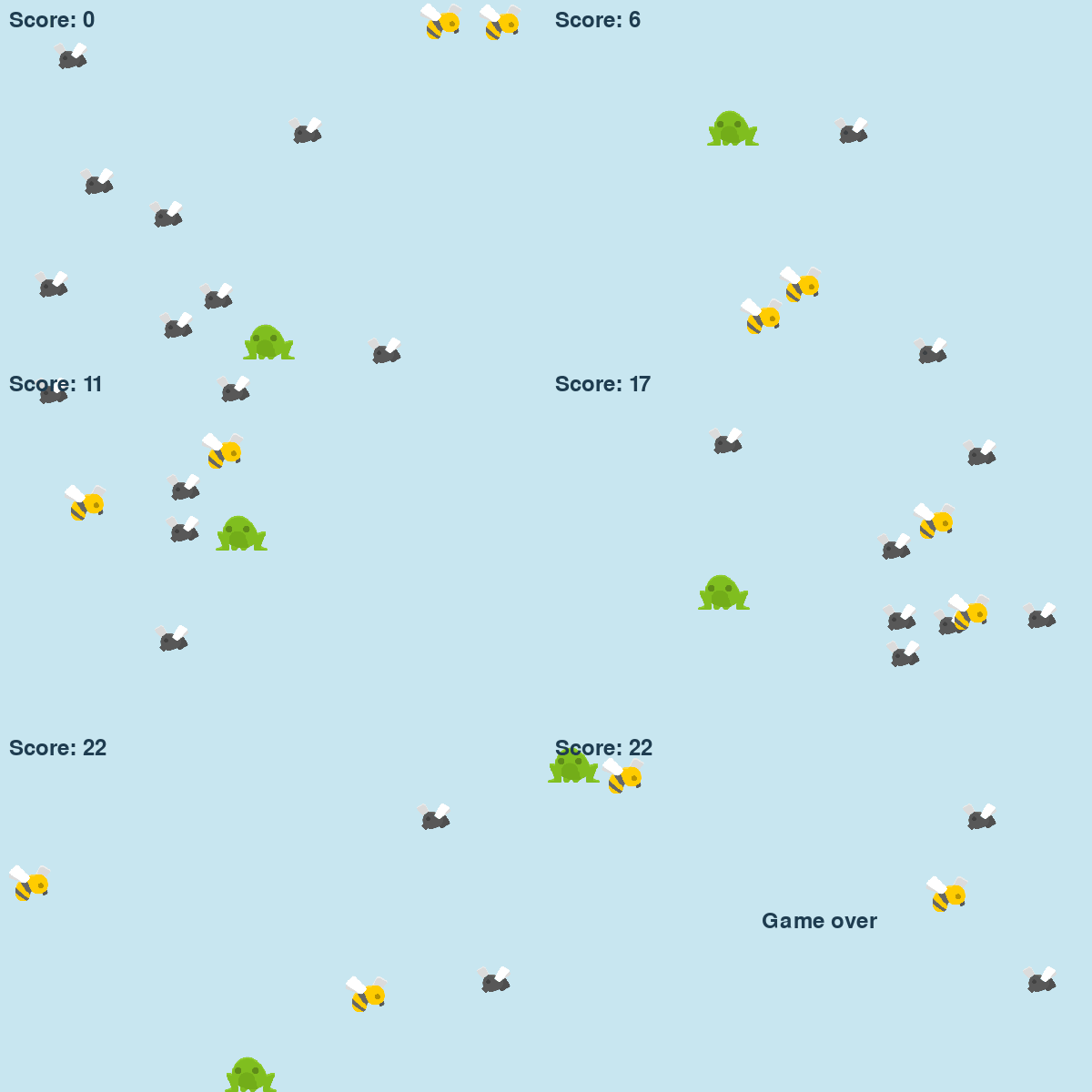
The homework builds on Lecture 19 (inheritance and polymorphism), Lecture 20 (animation and games), and Lab 6. In Lab 6, Rock and Snowflake were separate classes that repeated a lot of each other’s code. Here every class in the game is a child class of one parent class, Entity, so the shared code is written once. Parts 1-3 are also good practice with inheritance for Exam 4.
Read the whole writeup before you start. Then write one method at a time, and test each one before moving on.
Part 0: Setup
Click “Download Starter Code” above to download hw7.zip. Move it to your cs145/homework folder, then extract it (Mac: double-click it; Windows: right-click it and choose “Extract All…”) to create a hw7 folder with these files:
hw7.pyis where you write your code.frog.png,fly.png, andbee.pngare the images. Keep them in the same folder ashw7.py.
Open hw7.py in Thonny and run it. A window should open showing an empty pale blue pond; close it to stop. If you get ModuleNotFoundError: No module named 'pygame', see Part 0 of Lab 6.
The images are from Kenney, who makes game art that anyone may use for free.
Getting started
At the top of hw7.py are constants for the sizes, speeds, and image files; use them rather than typing numbers like 600 or 40. Then come four classes and the function play().
            Entity
          /    |    \
     Player   Fly    Bee
Every Entity has two attributes: rect, a pygame.Rect that says where it is and how big it is, and image, its picture. Entity.__init__ is given: it makes the rect, loads the image from a file, and scales the image to the size of the rect. So that code is written once, and each child class gets it by calling super().__init__.
Each child class inherits what it can from Entity and writes only what’s different:
| Class | __init__ |
update |
draw |
Its own methods |
|---|---|---|---|---|
Entity |
given | given: does nothing | Part 1 | collide |
Player |
calls super().__init__ |
inherited | inherited | move, collect |
Fly |
calls super().__init__ |
inherited | overrides | reset |
Bee |
calls super().__init__ |
overrides | inherited |
play() is the game loop from Lecture 20 and Lab 6, with a # Part comment wherever you’ll add lines. It keeps every object of the game in one list, entities, and these two loops, which are given, run the whole game:
for entity in entities:
    entity.update()
for entity in entities:
entity.draw(screen)The loops don’t know or care which entities are flies and which are bees. Each object runs its own class’s version of the method: this is polymorphism, as with speak for the pets in Lecture 19.
As in Lab 6, test each method in the Shell. When you %Run hw7.py, close the game window first, then type your tests.
Part 1: Entity
Complete two methods of Entity. Every child class will inherit them.
collide(self, other)returnsTrueif this entity overlaps the entityother, andFalseotherwise. In Lab 5 you wroteintersectionfor your ownRectclass. Apygame.Rectalready has a method for this,colliderect, which you used in Lab 6:a.colliderect(b)isTrueif the rectanglesaandboverlap. Here the two rectangles areself.rectandother.rect.draw(self, surface)draws the entity’s image at the position of itsrect. Drawing an image on a surface is called a blit, and it takes one line:surface.blit(self.image, self.rect)
Test collide in the Shell. Any of the three image files will do for a test:
>>> a = Entity(0, 0, 50, 50, "frog.png")
>>> b = Entity(25, 25, 50, 50, "fly.png")
>>> a.collide(b)
True
>>> c = Entity(50, 0, 50, 50, "bee.png")
>>> a.collide(c)
False
a and c share an edge but don’t overlap. You’ll see draw work in Part 2.
Part 2: Player
The player is the frog. Complete the class Player, a child class of Entity:
__init__(self, x, y)takes only a position, because every player has the same size and image. It callssuper().__init__with all five thingsEntity.__init__needs:x,y, and the constantsPLAYER_WIDTH,PLAYER_HEIGHT, andPLAYER_IMAGE. That’s the whole method.move(self, dx, dy)moves the player by changingself.rect.xandself.rect.y, and keeps the player on the screen withmaxandmin, just as in Lab 6. The player isPLAYER_WIDTHwide andPLAYER_HEIGHTtall, so the largestxallowed and the largestyallowed are different.
Player has no draw and no collide of its own: it inherits them.
>>> p = Player(100, 100)
>>> p.rect
Rect(100, 100, 60, 40)
>>> p.move(5, -5)
>>> p.rect.x, p.rect.y
(105, 95)
>>> p.move(-500, 500)
>>> p.rect.x, p.rect.y
(0, 360)
Now put the player in the game. In play(), at the two # Part 2 comments:
- Before the loop, make a player at (
PLAYER_START_X,PLAYER_START_Y), store it in a variableplayer, and append it toentities. - In the loop, after
dxanddyare set from the arrow keys, move the player bydxanddy.
Leave the # Part comments in play() in the order given, even though # Part 3 comes before # Part 2: entities are drawn in the order of the list, so the frog is drawn over the flies, and the bees over the frog.
Run the game: you should see the frog, and the arrow keys should move it, stopping at every edge. The loop that draws entities called your Entity.draw to draw it.
Part 3: Fly
A fly stays in one place until the frog eats it. Then it is hidden, until reset brings it back somewhere else. Complete the class Fly, a child class of Entity with one more attribute, visible:
reset(self)moves the fly to a random position by settingself.rect.xandself.rect.y, and setsself.visibletoTrue. The whole fly must be on the screen: the docstring gives the ranges.__init__(self)takes no parameters. It callssuper().__init__for a fly at (0, 0) with theFLY_constants, then callsself.reset()to choose the real position. This is the pattern ofRockin Lab 6: the random choices are written once, inreset.draw(self, surface)overridesEntity’sdraw. If the fly is visible, it draws the fly the way any entity is drawn. Otherwise, it draws nothing.
Calling the parent’s version of a method. So far you have used super() only for __init__, but it can call any method of the parent class. Inside Fly.draw, the line
super().draw(surface)runs Entity’s draw on this fly, just as super().__init__(...) runs Entity’s __init__. Use it instead of repeating the blit line. Writing self.draw(surface) there would not work: that is Fly’s own draw, calling itself.
>>> fly = Fly()
>>> fly.visible
True
>>> fly.rect
Rect(137, 291, 40, 30)
>>> fly.reset()
>>> fly.rect
Rect(64, 130, 40, 30)
Your positions will differ: they are random.
In play(), at the # Part 3 comment, make an empty list flies. Then, NUM_FLIES times, make a fly and append it to both flies and entities. The game needs both lists: entities to update and draw everything, and flies for Part 4, which is only about flies.
Run the game: you should see 8 flies and the frog. Nothing happens yet when the frog reaches a fly.
Part 4: Eating flies
Complete Player.collect(self, flies), which takes a list of flies. It is in the Player class, above Fly in the file. Every fly in the list that is visible and that the player touches gets eaten: set its visible to False and count it. Return the count. A fly that is already hidden can’t be eaten again. Use self.collide(fly): Player inherited collide from Entity.
>>> p = Player(100, 100)
>>> near = Fly()
>>> near.rect.x = 110
>>> near.rect.y = 90
>>> far = Fly()
>>> far.rect.x = 400
>>> far.rect.y = 300
>>> p.collect([near, far])
1
>>> near.visible
False
>>> far.visible
True
>>> p.collect([near, far])
0
Now keep score in play(), at the three # Part 4 comments:
Before the loop, set
scoreto 0.In the loop, eat flies and add them to the score. When the last fly is eaten, bring them all back in new places. The score is then a multiple of
NUM_FLIES:eaten = player.collect(flies) score = score + eaten if eaten > 0 and score % NUM_FLIES == 0: for fly in flies: fly.reset()Draw the score in the upper-left corner, as in Lab 6:
text = font.render("Score: " + str(score), True, TEXT_COLOR)
screen.blit(text, (10, 10))
Run the game. Flies should disappear as the frog reaches them, and when you eat the last one, 8 new flies should appear.
Part 5: Bee
A bee bounces around the screen like a Ball from Lecture 20. Complete the class Bee, a child class of Entity with two more attributes, the velocities vx and vy:
__init__(self)takes no parameters. A bee starts at the top of the screen, at a randomx. Choosexfirst, then callsuper().__init__with it, then setself.vxandself.vyto random integers fromBEE_MIN_SPEEDtoBEE_MAX_SPEED. The docstring gives the range forx.update(self)overridesEntity’supdate, which does nothing. It moves the bee byvxandvy, then reverses a velocity if the bee is past an edge. This isBall.updatefrom Lab 6, with one difference: a ball stores its center and radius, but a bee has arect, whosexandyare its upper-left corner. So the bee is past the right edge whenself.rect.x + BEE_WIDTHis greater thanSCREEN_WIDTH.
Set the position and velocity yourself to test update exactly:
>>> bee = Bee()
>>> bee.rect.x = 545
>>> bee.rect.y = 100
>>> bee.vx = 3
>>> bee.vy = 2
>>> bee.update()
>>> bee.rect.x, bee.rect.y, bee.vx
(548, 102, 3)
>>> bee.update()
>>> bee.rect.x, bee.rect.y, bee.vx
(551, 104, -3)
>>> bee.update()
>>> bee.rect.x, bee.rect.y, bee.vx
(548, 106, -3)
After the second update the bee’s right side is at 601, past the edge at 600, so vx is reversed.
Finish the game in play(), at the two # Part 5 comments:
- Before the loop, make an empty list
bees. Then,NUM_BEEStimes, make a bee and append it to bothbeesandentities. - In the loop, check each bee: if the player collides with it, set
game_overtoTrue. The rest is given: oncegame_overisTrue, everything stops moving and “Game over” is drawn.
A collision means the two rectangles overlap, so a bee can catch the frog by the empty corner of its rectangle, without quite touching the picture.
Run the game. You didn’t write any code in the loop to move the bees or draw them: the two for entity in entities loops already do it, by calling Bee’s update and the draw it inherited.
How many flies can you eat?
Specification
At a minimum, your hw7.py should have:
- A class named
Entitywith the given__init__andupdate, a methodcollidewith one parameter, another entity, that returns whether the two overlap, and a methoddrawwith one parameter, a surface, that draws the entity’s image at itsrect. - A child class of
EntitynamedPlayerwhose__init__has two parameters,xandy, and callssuper().__init__, with a methodmovewith two parameters that moves the player but keeps it on the screen, as described in Part 2. - A child class of
EntitynamedFlywhose__init__has no parameters, with an attributevisible, a methodreset, and a methoddrawthat overridesEntity’s, as described in Part 3. - A method
collectofPlayerwith one parameter, a list of flies, that hides the visible flies the player touches and returns how many, as described in Part 4. - A child class of
EntitynamedBeewhose__init__has no parameters, with attributesvxandvyand a methodupdatethat overridesEntity’s, as described in Part 5. - A function
playthat runs the complete game.
Style and Design
- You must add your code to the provided starter file.
- At the top of the file, include your name (
Author:) and the resources you used (included in the starter file). - Keep the docstrings given in the starter file.
- Use the constants at the top of the file instead of typing their values.
- Let inheritance do the work: every child class calls
super().__init__,Fly.drawcallssuper().draw, and no child class repeats code thatEntityalready has. - Keep the game’s logic in the methods: the loop in
play()calls them. - Follow the Guidelines for Code Quality.
Common issues
Submitting your work
When you are done, submit hw7.py to Gradescope. You don’t need to submit the images.
The autograder checks your classes and that your game runs (23 points). We review your code style and your game loop ourselves (2 points).
Ensure that the upload succeeds and your submission passes all visible tests. Passing all of the visible tests does not guarantee that your submission correctly satisfies all of the requirements of the assignment. We encourage you to submit early and often so you have time to resolve any issues.