Homework 4
Objectives
- Write recursive functions with a base case and one or more recursive cases
- Turn a recursive function that prints into one that returns a list of tuples
- Compute values recursively with pending operations
- Draw fractals with the turtle using functions that make several recursive calls
- Bring the turtle back to where it started after a recursive drawing
Background
In this assignment you will finish the Towers of Hanoi from Lecture 11 and watch your solution play out. Then you will fill a Fractal Gallery: a Sierpinski triangle, a random tree, and a recursive drawing of your choice, in colors you choose.
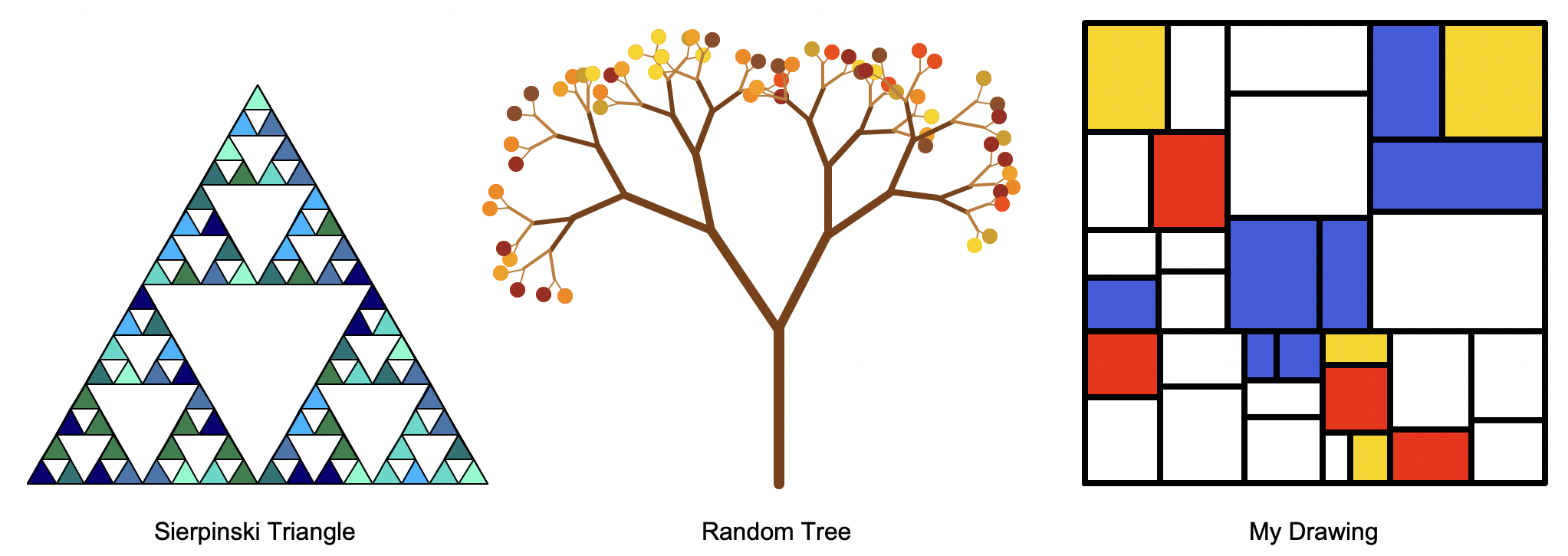
The homework builds directly on Lectures 10 and 11: hanoi starts from the version in Lecture 11, count_moves works like product, and the drawings work like draw_tree. Part 1 uses tuples, from Lecture 12.
Read the whole writeup before you start. Then write one function at a time, and test each one before moving on.
Part 0: Setup
Click “Download Starter Code” above to download hw4.zip. Move it to your cs145/homework folder, then extract it (Mac: double-click it; Windows: right-click it and choose “Extract All…”) to create a hw4 folder with three files:
hw4_hanoi.pyis where you write Part 1. Below your code, it has a providedmainthat prints and animates your moves.hanoi_show.pyhas the animation code thathw4_hanoi.pyuses. You don’t need to open it.hw4_fractals.pyis where you write Parts 2, 3, and 4. Below your code, it has a providedmainthat draws the gallery, plus two helper functions thatmainuses.
Both of your files are nearly empty: you will write each function and its docstring yourself. To close a turtle window, click the stop sign in Thonny.
Part 1: Towers of Hanoi – hanoi and count_moves
The Towers of Hanoi puzzle has three pegs, named "A", "B", and "C", and a stack of disks on one peg, biggest at the bottom. The goal is to move the whole stack to another peg, one disk at a time, never putting a disk on top of a smaller disk. To move n disks from the start peg to the final peg:
- Move the top
n - 1disks from the start peg to the spare peg, out of the way. - Move the biggest disk from the start peg to the final peg.
- Move the
n - 1disks from the spare peg to the final peg, on top of the biggest disk.
In Lecture 11, hanoi printed each move:
def hanoi(n, start, final, spare):
    if n > 0:
        hanoi(n - 1, start, spare, final)
        print("Move disk", n, "from", start, "to", final)
        hanoi(n - 1, spare, final, start)
hanoi
Write a new hanoi(n, start, final, spare) in hw4_hanoi.py that returns the moves instead of printing them. Each move is a tuple (from_peg, to_peg), and hanoi returns a list of these tuples, in order. Running hw4_hanoi.py calls hanoi(3, "A", "C", "B") and prints each tuple on its own line, so you can compare with Lecture 11:
Lecture 11 hanoi printed
Move disk 1 from A to C
Move disk 2 from A to B
Move disk 1 from C to B
Move disk 3 from A to C
Move disk 1 from B to A
Move disk 2 from B to C
Move disk 1 from A to C
hw4_hanoi.py prints
('A', 'C')
('A', 'B')
('C', 'B')
('A', 'C')
('B', 'A')
('B', 'C')
('A', 'C')
hanoi made 7 moves- Base case: when there are no disks, there are no moves, so return an empty list.
- Recursive case: return one list with the moves from step 1, then the move from step 2, then the moves from step 3. Join lists with
+, as indoubledfrom Lecture 11. The move from step 2 is a list with one tuple in it:[(start, final)].
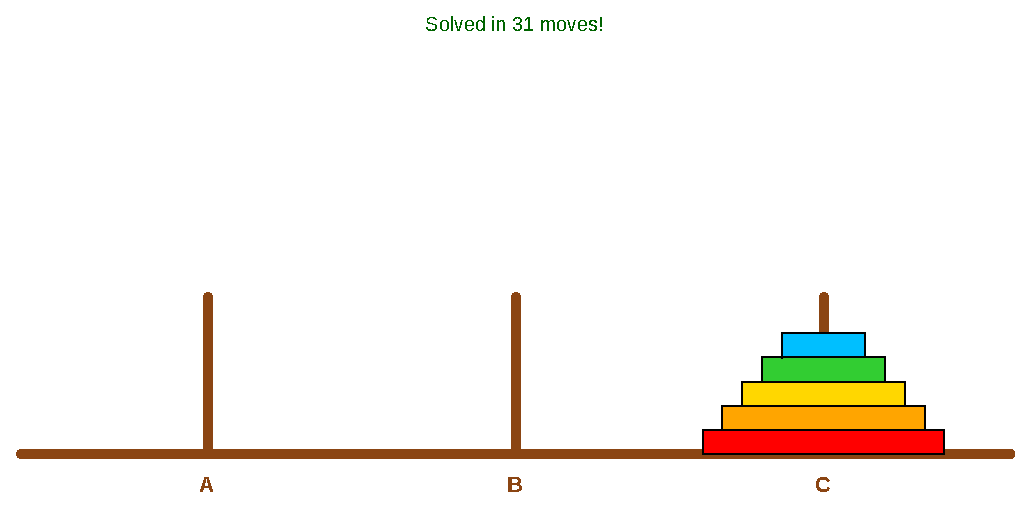
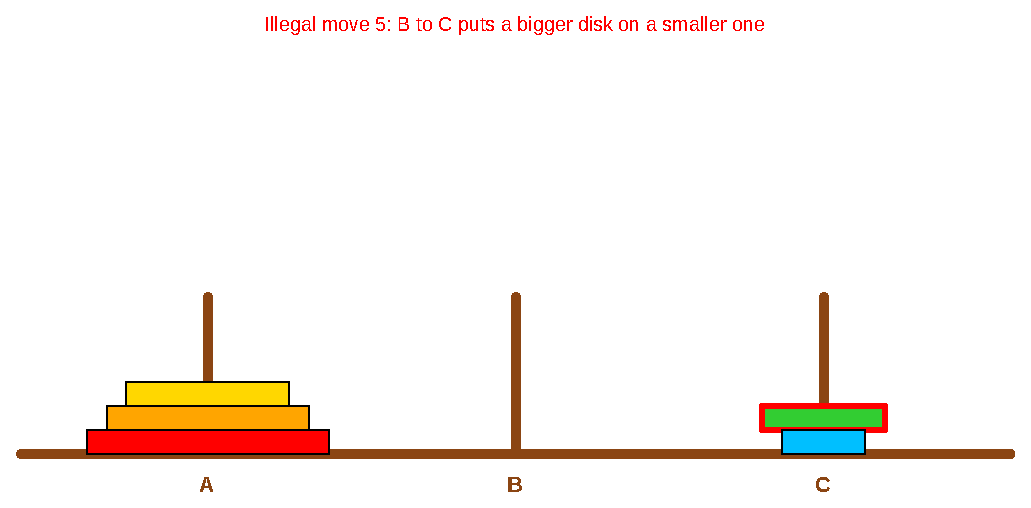
After printing, main animates your moves. If a move breaks a rule, the animation stops and shows the problem in red. To try a different number of disks, change NUM_DISKS at the top of hw4_hanoi.py to anything from 1 to 8. (Running it before you’ve written hanoi gives NameError: name 'hanoi' is not defined.)
count_moves
count_moves(n) returns the number of moves hanoi makes for n disks. In Lecture 11 we saw that this is 2n − 1, but here you’ll compute it recursively. Don’t call hanoi, and don’t use a loop, **, or pow. Instead, use the three steps: how many moves do steps 1, 2, and 3 each take?
n |
0 | 1 | 2 | 3 | 4 | 5 |
|---|---|---|---|---|---|---|
count_moves(n) |
0 | 1 | 3 | 7 | 15 | 31 |
To check it, uncomment the count_moves line in main. It should print the same number as the line above it.
The Fractal Gallery
Run hw4_fractals.py. You should see a window with three labels and nothing above them. As you finish each drawing, uncomment its line in main and run the file again.
You can change main however you like, but don’t change jump_to or label. main draws everything at once, so you won’t see the turtle move. To watch it draw, which helps a lot when something goes wrong, change t.tracer(False) to t.tracer(True) and use smaller levels. Before you submit, make sure main draws all three pieces, and remove any print lines you added.
Your drawings pick random colors from a palette: a list of color names. Near the top of hw4_fractals.py, the starter file provides four palettes: FALL_COLORS, OCEAN_COLORS, GARDEN_COLORS, and SUNSET_COLORS. For each drawing, use whichever palette you like, or define your own list as a constant. Python’s turtle knows hundreds of color names.
Part 2: Sierpinski triangle – sierpinski
sierpinski(size, levels) draws a Sierpinski triangle with sides size pixels long. The turtle starts at the triangle’s bottom-left corner, facing east (to the right), and must end there, facing east again.
- If
levelsis 0, draw one equilateral triangle, filled with a random color from a palette (userandom.choice). A loop works well here: go forward and turn left 120 degrees, three times. - Otherwise, draw three Sierpinski triangles with half the size and one fewer level, in the order shown below: bottom-left, bottom-right, then top.
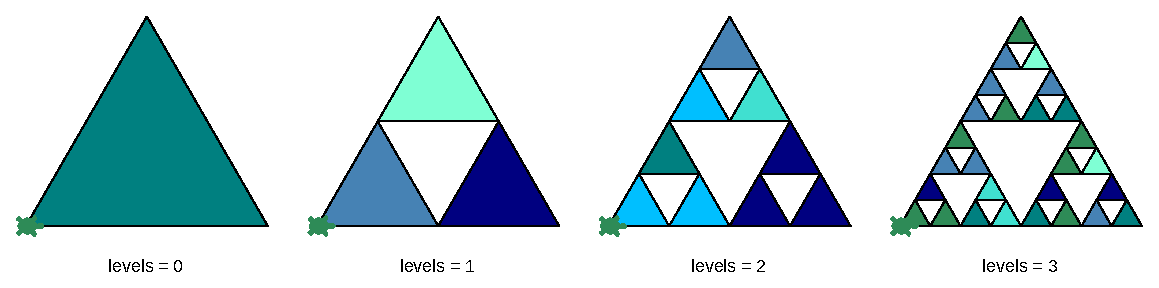
sierpinski(220, levels), with the ocean palette. The green turtle shows where each one starts and ends.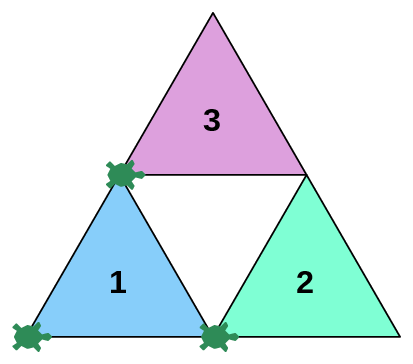
Before the second and third recursive calls, move the turtle to that triangle’s bottom-left corner (the turtles in the figure), facing east. After the third call, bring the turtle back to the start. Each smaller triangle ends where it started, so all the moves are along the edges of the big triangle and you can keep the pen down. Sketch the moves on paper first.
Part 3: Random tree – random_tree
random_tree(length, levels) draws a tree with a trunk length pixels long. It’s like draw_tree from Lecture 11, with randomness and colorful leaves. The turtle starts at the bottom of the trunk and must end there, facing the same direction it started.
- If
levelsis 0, draw a leaf: a dot in a random color from a palette. Pick the dot size (around 10 works well). Unlikedraw_tree, where 0 levels draws nothing, here 0 levels draws a leaf, so 1 level is a trunk with leaves at its tip. - Otherwise:
- Set the pen width to
levels, so branches get thinner as they go up. Use one color for thick branches and a lighter one for twigs (whenlevelsis 2 or less), such as"saddlebrown"and"peru". - Draw the trunk.
- Draw a smaller random tree turned left by a random angle, and another turned right by its own random angle. Each angle is a whole number from 15 to 45 degrees, and each smaller tree has one fewer level and a trunk a random 0.6 to 0.8 times as long as this one.
- Go back down the trunk to where you started. Lift the pen first, with
t.up(), and put it down again after, witht.down(): otherwise the thin twig-colored pen draws over the trunk.
- Set the pen width to
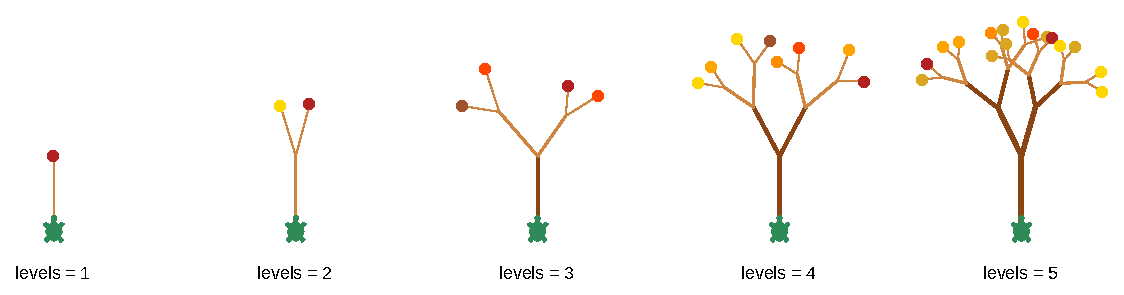
random_tree(70, levels), with the fall palette. Each run is different.To end facing the same direction you started, you need to undo each random turn exactly, so store each random angle in a variable before you turn.
Part 4: Your drawing – my_drawing
my_drawing(size, levels) draws a recursive drawing that fits in a size by size square. The turtle starts at the square’s bottom-left corner, facing east, and must end there, facing east. levels controls how much detail there is.
Pick one of the four drawings below, or design your own. Each of the four comes with a my_drawing that you can paste into hw4_fractals.py as is: your job is to write the recursive function that it calls. Click a title for directions.
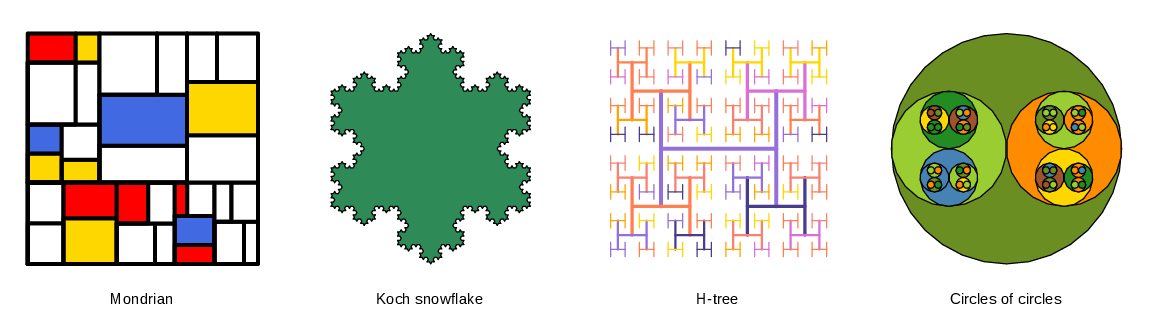
A Mondrian painting is either one colored rectangle, or two smaller Mondrian paintings side by side or one above the other.
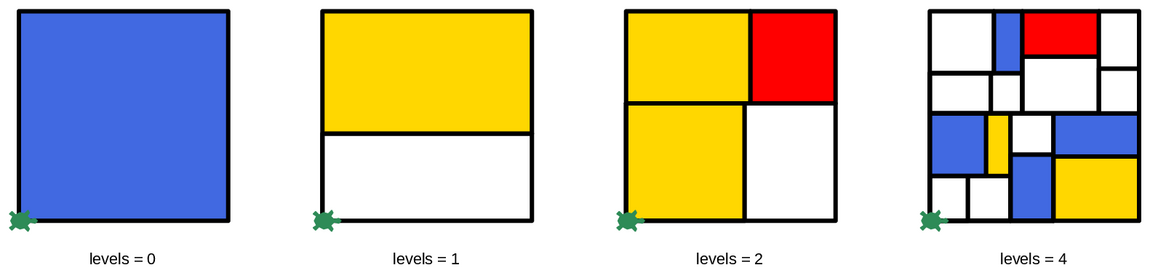
mondrian(200, 200, levels). Each run is different.Write mondrian(width, height, levels). The turtle starts at the painting’s bottom-left corner, facing east, and must end there, facing east.
- If
levelsis 0, draw awidthbyheightrectangle with a thick black border (pen width 4), filled with a random color from a list such as["red", "gold", "royalblue", "white", "white", "white"]. White is in the list three times so that it’s picked more often. - Otherwise, split the longer side at a random point, from 30% to 70% of the way along (use
random.uniform), and draw a smaller painting with one fewer level on each side of the split:- If
widthis bigger thanheight, draw a paintingsplitwide, move forwardsplit, draw a paintingwidth - splitwide, and move back. - Otherwise, draw a painting
splittall, move upsplit(turn left, go forward, turn right), draw a paintingheight - splittall, and move back down.
- If
Paste this definition of my_drawing into hw4_fractals.py. The provided main calls my_drawing with levels set to 5. Feel free to experiment with this value: for this drawing, 5 or 6 levels look good in the gallery. Your only job here is to write the recursive function mondrian that my_drawing calls.
def my_drawing(size, levels):
    """
    Draw a Mondrian-style painting that fills a size-by-size square, starting
    at its bottom-left corner facing east, and bring the turtle back there.

    Params:
        size (float) -- the width and height of the square, in pixels
        levels (int) -- how many levels of detail, 0 or more
    Returns: None
    """
mondrian(size, size, levels)A Koch curve is either a straight line, or four smaller Koch curves with a bump in the middle. A Koch snowflake is three Koch curves around a triangle.

koch(200, levels). The bump is on the turtle’s right.Write koch(length, levels). The turtle starts at one end of the curve, facing the other end, and must end at the other end, facing the same direction it started.
- If
levelsis 0, go forwardlength. - Otherwise, draw four Koch curves, each
length / 3long with one fewer level. Between them, turn right 60 degrees, then left 120, then right 60.
Paste this definition of my_drawing into hw4_fractals.py. It draws the snowflake like the triangle in Part 2, but with a Koch curve for each side, and fills it from OCEAN_COLORS (change that to any palette you like). Each bump is on the turtle’s right, which is the outside of the triangle. The provided main calls my_drawing with levels set to 5. Feel free to experiment with this value: for this drawing, 4 levels look good in the gallery. Your only job here is to write the recursive function koch that my_drawing calls.
def my_drawing(size, levels):
    """
    Draw a Koch snowflake, filled with a random color from OCEAN_COLORS, that fits
    in a size-by-size square, starting at its bottom-left corner facing east,
    and bring the turtle back there.

    Params:
        size (float) -- the width and height of the square, in pixels
        levels (int) -- how many levels of detail, 0 or more
    Returns: None
    """
    x, y = t.position()
    side = size * 3 ** 0.5 / 2
    t.up()
    t.goto(x + (size - side) / 2, y + size / 4)
    t.down()
    t.fillcolor(random.choice(OCEAN_COLORS))
    t.begin_fill()
    for _ in range(3):
        koch(side, levels)
        t.left(120)
    t.end_fill()
    t.up()
    t.goto(x, y)
    t.down()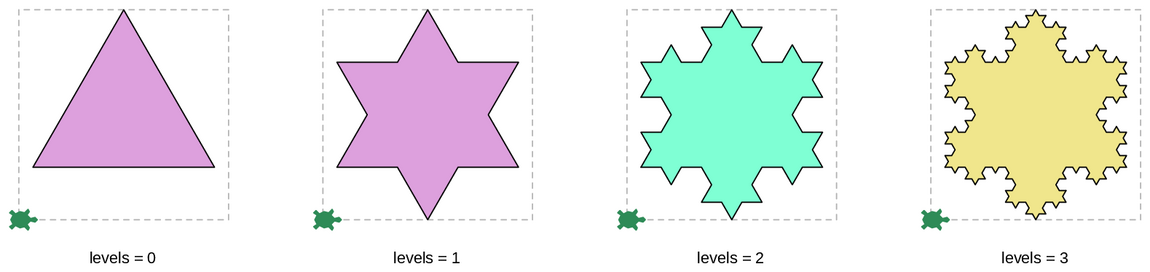
my_drawing(200, levels). The dashed square is the space my_drawing gets, and the turtle shows where it starts and ends.An H-tree is an H with a smaller H-tree at each of its four tips.
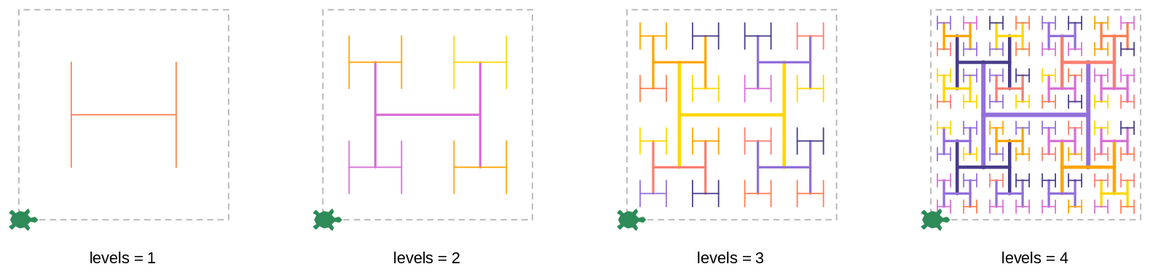
my_drawing(200, levels), with the sunset palette. The dashed square is the space my_drawing gets, and the turtle shows where it starts and ends.This one is easier to draw with t.goto than with forward and left. Write h_tree(x, y, length, levels), which draws an H-tree centered at the point (x, y). The H’s crossbar and its two legs are each length long, so its four tips are at (x - length / 2, y + length / 2), (x - length / 2, y - length / 2), and so on. The turtle can end anywhere.
- If
levelsis 0, draw nothing. - Otherwise:
- Set the pen width to
levelsand the pen color to a random color from a palette. - Draw the H’s three lines. To draw a line from (
x1,y1) to (x2,y2):t.up(),t.goto(x1, y1),t.down(),t.goto(x2, y2). - Draw four H-trees with half the length and one fewer level, one centered at each tip.
- Set the pen width to
Paste this definition of my_drawing into hw4_fractals.py. It centers the H-tree in the square and then brings the turtle back. The provided main calls my_drawing with levels set to 5. Feel free to experiment with this value: for this drawing, 4 or 5 levels look good in the gallery. Your only job here is to write the recursive function h_tree that my_drawing calls.
def my_drawing(size, levels):
    """
    Draw an H-tree that fits in a size-by-size square, starting at its
    bottom-left corner facing east, and bring the turtle back there.

    Params:
        size (float) -- the width and height of the square, in pixels
        levels (int) -- how many levels of detail, 0 or more
    Returns: None
    """
    x, y = t.position()
    h_tree(x + size / 2, y + size / 2, size / 2, levels)
    t.up()
    t.goto(x, y)
t.down()A circle of circles is a filled circle with two smaller circles of circles inside it. The two inside circles are side by side, then one above the other in the next level down, and so on.
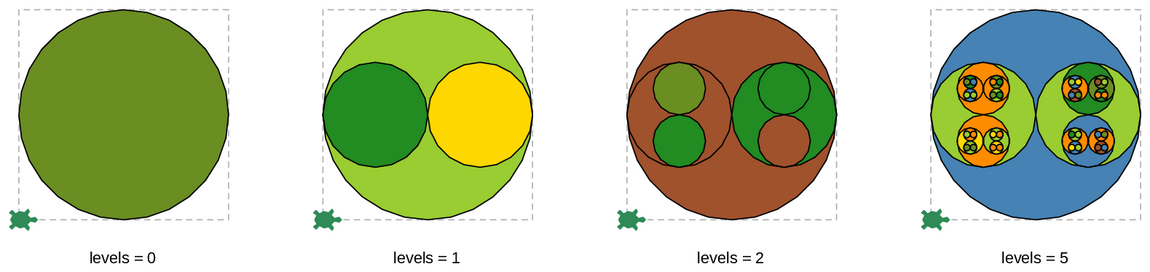
my_drawing(200, levels), with the garden palette. The dashed square is the space my_drawing gets, and the turtle shows where it starts and ends.This one is easier to draw with t.goto than with forward and left. Write bubbles(x, y, radius, levels, side_by_side), which draws a circle of circles centered at the point (x, y). side_by_side is True or False. The turtle can end anywhere.
- First, draw a circle with the given
radius, filled with a random color from a palette.t.circle(radius)draws a circle with the turtle at its bottom, facing east, so before drawing it, lift the pen,t.goto(x, y - radius), put the pen down, andt.setheading(0)to face east. - Then, if
levelsis more than 0, draw two circles of circles with half the radius and one fewer level:- If
side_by_sideisTrue, center them at (x - radius / 2,y) and (x + radius / 2,y). - Otherwise, center them at (
x,y + radius / 2) and (x,y - radius / 2). - Pass
not side_by_sideto both, so the next level switches direction.
- If
Paste this definition of my_drawing into hw4_fractals.py. It centers the circles in the square and then brings the turtle back. The provided main calls my_drawing with levels set to 5. Feel free to experiment with this value: for this drawing, 5 or 6 levels look good in the gallery. Your only job here is to write the recursive function bubbles that my_drawing calls.
def my_drawing(size, levels):
    """
    Draw circles of circles that fit in a size-by-size square, starting at its
    bottom-left corner facing east, and bring the turtle back there.

    Params:
        size (float) -- the width and height of the square, in pixels
        levels (int) -- how many levels of detail, 0 or more
    Returns: None
    """
    x, y = t.position()
    bubbles(x + size / 2, y + size / 2, size / 2, levels, True)
    t.up()
    t.goto(x, y)
t.down()Specification
At a minimum your submission should have, in hw4_hanoi.py:
- A function named
hanoiwith four parameters, the number of disks and the names of the start, final, and spare pegs, that returns a list of(from_peg, to_peg)tuples solving the puzzle, using recursion. - A function named
count_moveswith one parameter, the number of disks, that returns the number of moves needed, using recursion and without callinghanoi.
And in hw4_fractals.py:
- A function named
sierpinskiwith two parameters, the side length and the number of levels, that draws a Sierpinski triangle as described in Part 2, starting at its bottom-left corner facing east and ending there facing east. - A function named
random_treewith two parameters, the trunk length and the number of levels, that draws a random tree as described in Part 3, ending where it started, facing the same direction. - A function named
my_drawingwith two parameters, the size and the number of levels, that draws a recursive drawing as described in Part 4, and the recursive function that it calls.
Style and Design
- You must add your code to the provided starter files.
- At the top of each file, include your name (
Author:) and the resources you used (included in the starter file). - Don’t change
jump_to,label, orhanoi_show.py(exceptSPEED). When you submit,maininhw4_fractals.pyshould draw all three pieces. - Each function needs a docstring with its purpose, parameters, and return value. Spell out both the base case and the recursive case, as in Lectures 10 and 11.
- Use constants instead of “magic numbers”: for example, the angle range, the shrink range, and the leaf size in
random_tree. - Follow the Guidelines for Code Quality.
Common issues
TypeError: 'NoneType' object is not iterable in main of hw4_hanoi.py? hanoi doesn’t return anything. Check that both cases have a return.
TypeError: unsupported operand type(s) for +: 'NoneType' and 'list'? One of the cases in hanoi doesn’t return a list. Check that the base case returns [].
ModuleNotFoundError: No module named 'hanoi_show'? hw4_hanoi.py and hanoi_show.py must be in the same folder. Keep all three files in your hw4 folder.
RecursionError: maximum recursion depth exceeded? The recursion never reaches the base case. Check that each recursive call has one fewer level (or disk), and that the base case checks for 0.
A drawing is in the wrong place, or the drawings after it are? Your function doesn’t bring the turtle back to where it started. In main, add print(t.position(), t.heading()) just before and just after your drawing’s line. The two lines printed should match.
Twig-colored lines on top of the trunk? Lift the pen before going back down the trunk (see Part 3).
Submitting your work
When you are done, submit hw4_hanoi.py and hw4_fractals.py to Gradescope. You don’t need to submit hanoi_show.py.
Ensure that the upload succeeds and your submission passes all visible tests. Passing all of the visible tests does not guarantee that your submission correctly satisfies all of the requirements of the assignment. Some tests are hidden until after the grace period; they check cases such as 0 levels or disks and larger numbers of levels or disks. We encourage you to submit early and often so you have time to resolve any issues.