Submit these files:ArrayListString.java,hw03-reflection.json
In this assignment, you will implement your own version of an ArrayList.
Implementing stubs
Please prepare for implementing your ArrayList by reviewing the slides from Lecture 4T for the concepts we used to design a DIYList.
Instead of parametrizing our version of an ArrayList in terms of any type of stored item, we’ll only store Strings. So we will call this class ArrayListString and we will not use generics in this assignment.
The initial template is quite minimal and only sets up the ArrayListString with the items and size fields, as well as the capacity() method. Your job is to implement the methods listed below which should match the descriptions in the official ArrayList documentation. You don’t need to implement all the methods defined for an official ArrayList, just the ones listed below.
Although the capacity() method is not specified in the official ArrayList documentation, we’re adding it to our version since it may be useful for testing (and the Gradescope tests will also check the capacity).
Also, the official ArrayList implementation is supposed to throw exceptions if an index is out of bounds. We haven’t talked about exceptions so you don’t need to check the bounds of the indices passed to certain methods. The Gradescope tests will always pass valid indices (0 <= index < size()).
Here are the methods you will need to implement. The description you need to follow is linked in each method name below.
public ArrayListString(): This is the default constructor with no parameters. The initial capacity should be set to 2 in our version, as we did in class, even though the documentation says the default initial capacity should be 10.
public boolean add(String item): Note that this method always returns true. Remember to check if you need more space. As we did in class, when you need more space, double the capacity. You might want to first write the ensureCapacity method (below) and then come back to the add method.
public void clear(): No need to null-ify all the items - the Gradescope checks will only check the size() after a call to clear().
public void ensureCapacity(int minCapacity): Creates an array with minCapacity slots. Copies items from the previous items array into the new one. Assume minCapacity is always greater than the current capacity.
public int indexOf(String item): Make sure to handle the case when item is not in the list. This should return the index of the first occurrence of item in the list.
Start by writing stubs for all of your methods. They should have the final method signature and return a placeholder value of the correct type. For example, for add:
publicbooleanadd(String item){returntrue;}
This will allow you to write tests and enables the code on Gradescope to compile properly! The starter code for the programming exam also includes stubs, if you are unfamiliar with the concept.
Warning
Having at least a stub for each required method is necessary to earn any credit on this assignment! Make sure your stubs compile before you do anything else.
If you use java.util.ArrayList or another existing list implementation in your code, you will not get credit.
Testing your implementation
You should write comprehensive test cases in the main method of ArrayListString.java. These are the requirements you must meet in your test cases:
ArrayListStringsize is checked
ArrayListStringremove is called
ArrayListStringindexOf is called
ArrayListStringisEmpty is called
at least 5 elements are added to an ArrayListString
ArrayListStringget is called
ArrayListStringset is called
ArrayListStringclear is called
ArrayListString is initialized
These requirements are listed before the implementation part of the assignment because I’d like you to get in the habit of writing test cases while or even better before you write your code! If you write tests before you write your code, you are practicing test driven development. This is useful because you’ll (a) think through what the effect of each method should be before starting to write it and (b) have a set of test cases ready to debug your implementation as needed.
Implementing your ArrayList
Now, implement each method according to the descriptions above. Run your tests after each change you make to confirm that each method does what you expect!
Documentation, Style, and Design
Style
This is the first assignment where the checkstyle style checker will count towards your grade. Checkstyle is configured on Gradescope to use the Google Java Style Guide. The rules are a superset of what we introduced in class. See this page for details on how to use checkstyle and how checkstyle violations are incorporated into your score.
Documentation
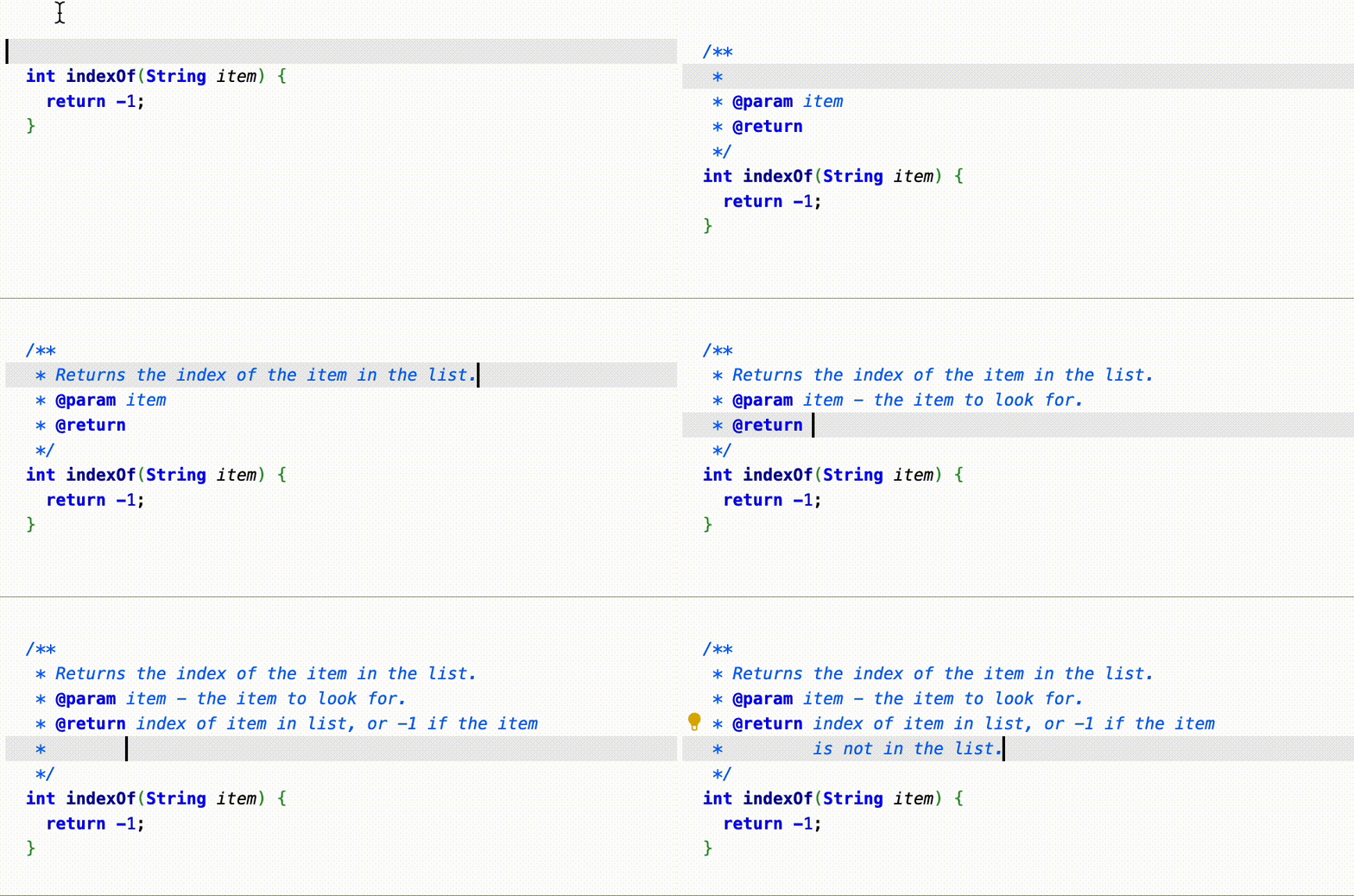
In addition to style, checkstyle will check that you have written comprehensive documentation, which you should add to each method. To create a javadoc documentation comment, type /** right above one of your methods and then hit the Enter (or return) key. VS Code should autofill a javadoc-style documentation as in the animation below:
The documentation you add for each method should include three main components: (1) a short sentence describing what the function does, (2) a brief description of each parameter using @param and (3) what the method returns using @return. When describing each @param, it’s also good practice to describe any limitations on the parameters.
Design
Checkstyle checks for style and (some) documentation; I will do a manual review for design. Up to 5% may be deducted from your final score due to design problems. This will also include checking the quality (rather than just the form) of your javadoc comments!