Functions
0. Learning objectives
- What is a function?
- How do we use functions to abstract elements of our program?
- Creating your own function
- How do we call functions?
- What is the relationship between variables and functions?
- I see functions, they are everywhere! How to use modules
1. Functions
Creating variables is useful for abstraction, because it means we can re-use a variable over and over again in different calculations or keep track and change a value. But what if you want to do the same calculation multiple time using different values for the variables? Think about our first example when we were discussing algorithms:
Sally has 12 apples. She gives 3 apples to Manuel and buys 6 apples from Jiao. How many apples does Sally now have?
We asked ourself: what if every day we have different number of apples to start with and different number of apples for each transaction? Can we come up with an algorithm that always works?
This is a very common question: can we generalize a specific problem and come up with a more general solution? It is so common that pretty much every programming language has a construct that allows us to do just that: abstract and generalize.
This is where functions are useful: they allow us to abstract some calculation in terms of the variables that go into the calculation.
If we assign to the variable apples_start the number of apples Sally has when she starts, to
apples_given the apples Sally gives away, and to apples_bought the number of
apples Sally buys, can you come up with an expression that describes how many apples are left at the end
of the day?
What about apples_start - apples_given + apples_bought?
We can even assign the result to a new variable:
apples_left = apples_start - apples_given + apples_bought
Now that we think about it, does it even matter if it is Sally or somebody else who is dealing in apples? No! abstraction at work!
Even better, if we use more general variables names, we don't even care if what is exchanges is apples or oranges as long as we have a starting number, some are taken away, and some are added (even more abstraction!):
left = start - given + added
Despite being a trivial example, this gives you a feeling of the power of abstraction: you can remove the details and write code to solve more general problems that are somehow similar.
A similar approach can be applied to the cereal example we discussed before. Our brains were pretty good at realizing what steps are the same and what should be allowed to change. So we could just write an algorithm that gives instructions for pouring cereal and eating it, allowing the user to specify the type of cereal we want. Whenever we want some cereal, we just run the algorithm and specify the type of cereal.
Great! We get the idea that there we can generalize ideas and we saw that we can write instructions in Python that implement those ideas and allow us to perform a calculations between variables that represent "things" that we might want to change between different "runs" of our algorithm. What we are missing is a mechanism to tell Python that this bunch of instructions, that uses this bunch of variables to implement an algorithm, should be consider a "block of instructions" that we might want to run with different values for the variables...
Fear not! As I mentioned before, pretty much every language allows you to do this using functions.
Before we look at the syntax to define your own function, can you think of some things that we might have seen before that looked like function?
type(), int(), float(), str(), and
bool() are all examples of functions that come wih the Python Standard
Library. They are referred to as built-in function since they
come included with Python. (Don't worry too much about all the other functions that you might
see listed and the pages and pages of documentation about the standard library. We will look at
many of the key components of Python a step at a time!)
2. Defining your own functions
On the right, you should see an example of a function definition in Python. Notice that the syntax
highlighter (that feature in IDEs that recognizes different parts of the code, depending on the
language, and colors them) colors the def word is in blue because it is
a reserved Python keyword. Other IDEs might color it in different colors (in many you can even specify
your favorite coloring theme): it should be purple in the example below. (Also
notice that, if you are editing your code in a text editor that does not have a syntax coloring
extension, it might just look like plain text, but it will still be recognized by the interpreter).
There are a few key ingredients we need in order to define a function.
|
Declare your function. The declaration must be started with the After the Then you list all variables that your function needs to do the calculation you want
surrounded by parentheses. These are the arguments (inputs variables) to your
function. You can have as many inputs to your function as you want, and you must separate
them using commas. In the example on the right, we have two arguments After the colon, anything you want to write inside your function must be indented by the
same amount relative to the function declaration. According to the Python
specifications, the indentation can be anything, as long as it is consistent within a single
block (yes, it can be different from block to block). My recommendation is to always use
2 or 4 spaces (4 is the de facto standard for Python). Most IDEs will automatically
enter those spaces for you as soon as you go to a new line within a block or as soon as you
press the tab key on the new line. Python will let you know if it finds an
inconsistency in your indentation with a nice
The first indented thing you should place in the body of your function is a
docstring. The docstring is written by you for humans and it describes
what your function does and some additional information about arguments and returned value
(more about In Python you can use either
'single' or
"double" quotes to define strings as long as you match the opening and
closing quotes (more about it later), so even docstring can use either
"""triple double""" or '''triple single''' quotes. |
|
In the example, the docstring describes what the function does: it adds two numbers together. It also defines what we are expecting the type of the input variables to be, and what the type of the value returned by the function is going to be. Docstrings are optional, Python does not require them, but it's good practice to use one. It really helps making your code more readable and maintainable (imagine opening large program you didn't write - or one you wrote months earlier - and just find code, no comment whatsoever... I promise you it is going to be a nightmare trying to figure out what is going on or what you were thinking). In this course, you will always be required to write docstrings for your functions.
After you described what you function does, it is time to actually make your function do something! This might involve computing intermediate expressions, showing stuff to humans (printing), anything you need to achieve the purpose of the function.
|
Once you are done with the computation, your function might or might not need to
return one or more values so that it can be used for additional computation. This is
accomplished by the Python function always return a value. If you don't specify a particular value using
Check out the function |
3. Calling (executing) functions
If you look at the two examples, we first have the definition of our function, then the
indentation disappears, indicating the end of the block of code that is part of the function, and we see
one or more function calls (e.g., z1 = add(2, 3)).
In order to call a function, you have to provide all the arguments required in the function header. Our
function add(), for example, requires two arguments (x and y)
whereas our function no_return_value() only requires one argument (x).
In the first example, you can see that in line 14 we are calling the add() function passing
the two required values (add(2,3)). The function does its job, adds the two values and
stores the result of the addition in the variable z. After that, the function returns the
value of the variable z (5) and the value is assigned to a different variable
(z1). We then show the content of the variable z1 to humans using the
print() function.
As you can see in line 17, we can also nest function calls to pass the output of one function
into another one. This is an example of composition that, as we mentioned, is a very powerful
approach to build solution to complex problem by composing solution to simpler problems. In this case,
Python evaluated the innermost function and uses the returned result from that call as value for the
argument of the next call. In the example, we call add(add(2,3), 7 ) which first evaluates
add(2, 3) to give 5 which is then used as the first argument to the outermost
function, which evaluates add(5, 7) to produce the final 12.
The second example is designed to show two things:
- A function in Python will always return a value. If you do not specify one, it will return
None print()is for humans: it displays a message on the console, the value of a variable in this case;returnis used by a function to return a value to another piece of code and it is not for humans' consumption!
To execute the code in an example, you can press the Run button. This will show the output generated by the script below the code.
Warning: To reiterate, the print() function prints the value of its
argument, typically a variables or a string, or a combination of the two, to the console for the
human who is running the code. return is a Python instruction
that returns one or more values back to whomever called the function. A very common source of
confusion is to think that print() "returns" a value to whomever called the
function. THIS IS WRONG! Look one more time at the no_return_value()
example. We print the value of x but we do not use return to return the value of x to the caller. The
result is that the variable z gets assigned the value None, that we
then print.
print() function itself does not return the value that it prints, it
returns None.
What do you think the following is going to display? print(print('hello'))
Python will first evaluate print('hello') since this is the innermost function
call. This will display hello in the console. Then print will
return None. Therefore, the outermost print() will receive a
None as argument and it is going to show it on the console.
4. Variable scope
|
Remember when we said that variables are like little boxes that hold values? Some questions might have had are:
Consider the code in the example below. It is pretty confusing, isn't it? Why do you find it
confusing? The main issue is that |

|
So, how does Python keeps all these variables straight?
Each time Python executes a function it creates the equivalent of a larger box (associated with the function) in which it stores all the boxes associated with the variables we define within that function. This is called the scope. (We also call this scope stack frame or frame). This happens each time a function is called! If you call a function from within a function, as soon as the new function is called, a new nested scope is created.
In the example below there are two scopes:
- the __main__ scope. This is the scope associated with the part of the script that is not
within a function (from line 11 on). This is also the scope associated with the shell in Thonny. In general, the place where you can see the
>>>. - the scope associated with the
times_two()function.
The scope (and all the variable defined within that scope) exist as long as the scope is valid. The scope of the function, for example, is valid as long as the current function call is executing. After the function is done, the box is thrown away with all the variable boxes inside. If you call the same function twice (as in the example below), the second time you call the function, Python is going to create a new scope.
So, all the variables that are define within a function, only exist as long as a function call is
executing. They stop to exist once the function is done and, if you call the function again, it is going
to be a new set of variable which have nothing to do with those that existed during the previous call.
The only way for a function to return the value of one of its variable to some code that is executing
outside of the function, is to use the return statement.
So, now that you know about scope, pick a piece of paper and a pencil, and see if you can identify the different scopes in the code below. You can use boxes/frames to identify scopes and boxes inside those boxes to identify variables.
When you run the code, Python:
- creates a the main scope
- associates the definition of the function
times_two()in that main scope - executes the assignment
x = 1and associates the definition of the variablexwith the main scope - evaluate the expression
x + 1and calls the functiontimes_two()using the resulting value (2) - create a scope for the
times_two()function. The variablexdefined in the argument, that will have initial value 2, exists only as long as this particular call to the function is running. - executes the statements inside the function and finishes the function returning the
calculated value (
4) - destroys the scope created for the
times_two()function call (and, with it, all the variables that we defined during the function call) - continues evaluating line 14. Here we are calling again
times_two()this time withx + 2. Since we are back in the main scope, the value ofxis still1. Thisxis not the samexas the one that existed in the scope of previous function call. So, we execute again steps 5 to 7 starting with a different argument value - once we are back from the second call to
times_two(), it can finally add the two returning values (4 + 6) and assign the result to the variablexin the main scope - prints (for humans) the content of the variable
xin the main scope:10
Here are another couple of examples for you to examine.
The first one is quite similar to the one above. We just use the print() function and
additional comments to highlight the scope of the various functions.
The second example it is a little more complex and you can see that the same function is called twice, each time with a different parameter. Use the debugger in Thonny to look at how Python handles the different calls.
|
For this last example, here is how the stack diagram (sequence of stack frames/scopes as the script gets executed) looks. This is an animation of the execution. You can get the same effect using the debugger in Thonny. In that case, each stack frame (or scope) is going to be the little window that Thonny pops up every time you step into a function. |
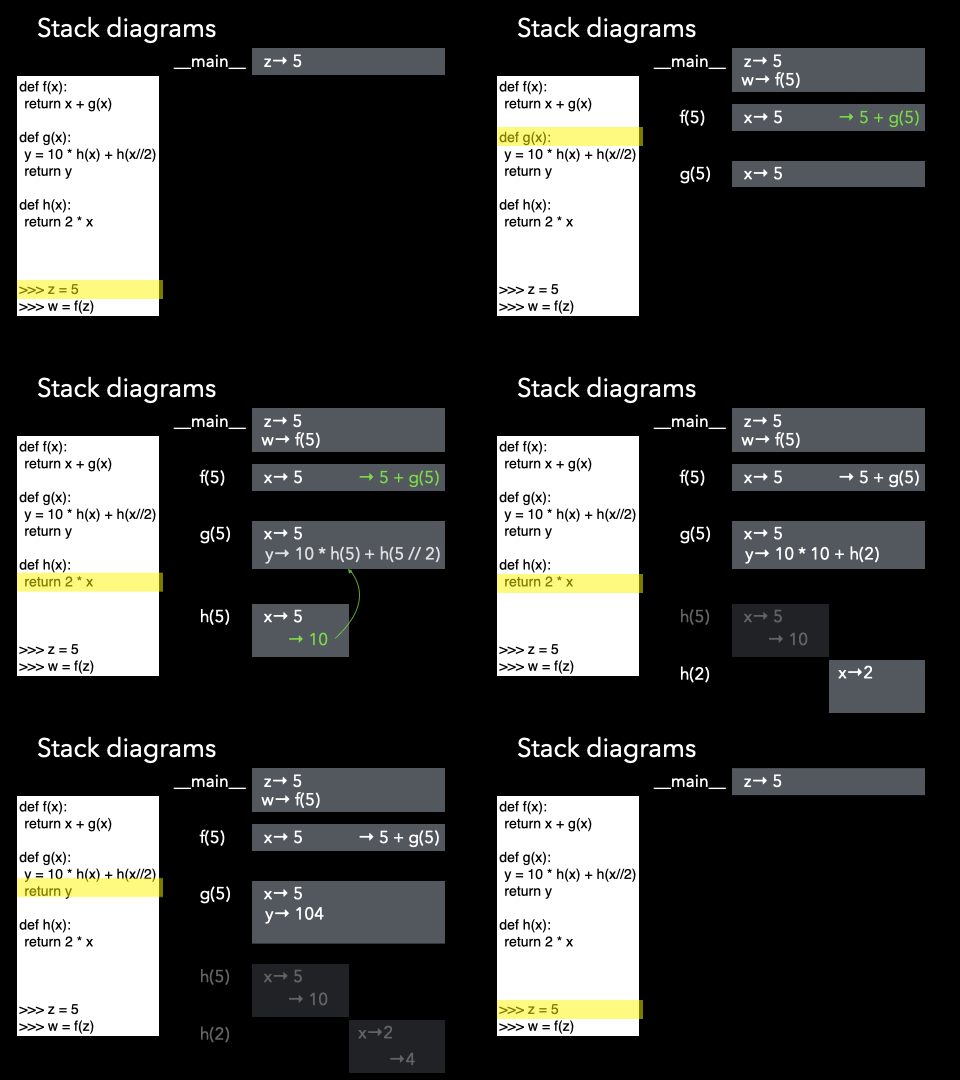 |
Now, there may be cases in which the input variable is indeed modified by the function, but this only happens with special variable types, and we'll see that in a few weeks.
5. Accessing functions in modules
Imagine you wrote a bunch of functions that help someone eat cereal in a file called
cereal.py. Maybe this file has the following function headers:
grab_bowl(size): retrieves a bowl for an input bowl of volume given byvolume,pour_cereal(cereal, amount): pours someamount(number of cups) of cereal of type specified by the string argumentcereal,eat_cereal(): a function to eat the cereal from the bowl you set up. Note that this function does not take any argument! Yes, you can define function that do not take arguments. The syntax to define them is still the same, you just don't place any argument between the parentheses when you define the function and you do not pass any argument when you call it. You still need to use parentheses when you call your function otherwise how would Python be able to distinguish between a function call and the name of a variable?
|
To be able to access these functions that we wrote, we have to tell Python that it should
grab them from our file by importing them. This can be done using the Python keyword
|
|
First we call import cereal. Then the functions defined in
the cereal.py module (file) are accessible by calling cereal.grab_bowl(500),
cereal.pour_cereal('froot loops', 1) and cereal.eat_cereal().
We will use a few modules that are built into Python but there are gazillions of modules out there that have been developed to solve all sorts of problem and are ready to be downloaded, installed, imported, and used!
One that comes with the Python standard library is the math module, which contains a lot of
useful functions for doing mathematical operations, like square-roots, powers, and trigonometric
functions. The example below shows you how you can import and use the
math module in a Python script. The great thing is that, thanks to composition, you can use
any function (the one you develop or the one you import from modules) inside other function to build
tools capable of solving the most complex problems!
Finally, if you want to know what functions are available in a module, you can use the
dir() function passing as argument the module you have just imported. This will give you
the list of all functions (and variables) in that module.
Try it in Brython! type importmath and then type
dir(math). You should see a list of all the functions you can call! You will also see a lot
of other strangely named objects (starting with a single or a double underscore (_). You
can safely ignore those for now.
If you want to know how to call a specific function and what that function does, you can then use the
help() function and pass as argument, the function you are interested. For example, calling
help(math.pow) (after having imported the math module) will give you more info
on how to use the pow() function. Note that this documentation is the docstring! And
that's why it is important that you add docstrings to your functions!
Unfortunately, Brython has a very limited support for the help() function - a lot of
the docstrings were stripped away to minimize the size of the code embedded in the browser! You can
definitely use the help() function in Thonny or pretty much most of the other
IDEs.
Exercises
Write a function that converts from Fahrenheit to Celsius. It should:
- have a meaningful and descriptive name
- atake an integer number as argument representing the degree Farrenheit
- calculate the corresponding degree Celsius (if you are not familiar with the conversion, hunt for it on Google)
- print the resulting Celsius so that us, poor humans, can see what the conversion is
- return the result of the conversion so that somebody can use your function in their code
- have a nice docstring
- have some comments describing what is going on