Algorithms & bugs
0. Learning objectives
- Develop algorithms to solve daily problems
- Describe algorithms in terms of pseudocode
- Describe the difference between interpreted and compiled programming languages
- Introduce Python and Thonny
- Describe the different types of error that might exist in a program
1. What is computer science?
There is not single definition of Computer science. It spans a vast set of fields trying to answer questions like
- Can this problem be solved with computation?
- How long is going to take to solve it?
- What is the best approach to solve it?
- and many more...
You probably already have a fair amount of practice at solving problems. For example, your math teacher likely gave you problems like:
Sally has 12 apples. She gives 3 apples to Manuel and buys 6 apples from Jiao. How many apples does Sally now have?
Sally clearly has $12 - 3 + 6 = 15$ apples now!
This is great, but what if we want to generalize this problem? What if we want to change the numbers? What if on Monday Sally starts with 17 apples, and on Tuesday she starts with 13 apples? Maybe Sally also buys and gives different amounts of apples each day and she would like to have a quick way to just use those numbers to evaluate how many apples she has left at the end of the day.
This is where the computers come to the rescue!
Obviously this is a trivial example, but there is one key idea at work here: abstraction. Abstraction
is an approach that allows us to generalize a problem by hiding details. Which details? In this
particular case, we want to come up with a way to evaluate how many apples are left based on a starting number,
how many are given, and how many are are bought. The exact numbers are the details we want to hide.
Abstraction is important because there is only so much detail we can deal with at any one time. We will see that
this powerful approach will allows us to solve larger problems by abstracting away layer after layer.
2. What is an algorithm?
How can we get the computer to calculate how many apples are left?
The first thing we need to do is define
our problem.
- What are the inputs?
- What are the outputs?
What do you think are the inputs and outputs in this case?
Output: number of apples left at the end of the day.
What do we need next?
Next we need a way to answer the question "how many apples are left at the end of the day?" or, more abstracted: "how do we combine our inputs in order to evaluate our outputs?" This will be the "idea" we have in our heads of how we will solve the problem.
What would be a possible approach?
The solution that we come up with will be in the form of an algorithm: an unambiguous sequence of computable steps that, if followed exactly, will solve the problem under consideration (achieve some goal) in a finite amount of time.
In general an algorithm:
- Has a finite number of steps (instructions)
- Each step (instruction) is well-defined (unambiguous) and executable (computable)
- Eventually halts (the algorithm comes to completion in a finite amount of time)
- Solves a general class of problems (abstracts away details)
Algorithms are everywhere. Believe it or now, you probably execute several (maybe not computational) during a day.
Can you think of few examples?
Problem: let's say you're hungry.
How do you solve this problem?
Algorithm: go eat some food.
In the example above, the solution above is a little (or a lot) too abstract for a computer. It hinges on a lot of assumption on pre-existing knowledge for humans as well. Stop for a second and think about all the additional instructions you would need to give to somebody who has just arrived and is not familiar at all with how things work around here. Nonetheless, even in this situation, you can count on some understandings that we share as humans (gravity, the fact that you need containers to contain things, etc.).
We can break the abstract instruction "go eat some food" into more detailed steps that, "if followed exactly will solve the problem under consideration":
- Stand up.
- Walk to the cafeteria.
- Grab a bowl.
- Pour some Honey-Nut Cheerios (a breakfast cereal).
- Pour some almond milk into the bowl.
- Eat cereal.
|
If you think about it, some of these are still very abstract. Where is the cafeteria? What does it mean "to pour"? Do you use the same action for the cereal and the milk? The verb is the same! What would happen if you gave these steps to a robot (which is basically a computer)? Would it know about gravity? Or what does "to pour" mean? Probably not! Assuming that you can give precise instructions to get it in front of the cereal station, you would probably end up with a bowl full of almond milk with cereal on the floor. The level of detail you need in your algorithm will depend on the ability of the entity that executes it to understand abstract instruction. For computers this ability is non-existent! You have to provide a sequence of well-defined and unambiguous instructions for them to execute. These instruction will describe your algorithm (your idea) into a language written with a specific syntax that the computer can understand, a programming language. We will discuss it in a little bit but right now, let's consider the following: what does happen if there is some type of error in the sequence of instructions that you are giving, in your algorithm? This might result in an undesired result (cereal on the floor). This is called bug. A bug occurs when your instructions (algorithm) are asking a system (robot, computer, etc.) to do something it could not do (whatever might be the reason). You (the programmer) did not mean for this error to exist, it just happens because we are... well... human and we make mistakes when we create our algorithm and even more when we implement them. The process that we use to find out these error and correct them is called debugging and it can be both rewarding and frustrating, but it is definitely necessary! (More about it later). |
 Grace Hopper in a computer room in 1978 (Wikipedia). |
So, let's assume you wrote an algorithm to go to the cafeteria and fill a bowl with Honey-Nut Cheerios, and tomorrow you decide that you want Froot Loops, aor Corn Flakes, or maybe some healthier oats? A lot of the algorithm will remain the same: you still need to get to the cafeteria, grab a bowl, etc... There is no reason to re-write all these steps, since the only thing that changes is the what you want to eat. We will see how we can use once again abstraction to group together instructions that we want to reuse while allowing to specify which cereal we want to pour! This will start making sense once we start learning about functions or methods (no spoilers!).
If you want to get a feeling about writing algorithms to control very simple machines, try playing with the following:
-
rodocodo (hour-of-code). The goal
of this game is to design algorithms that, using simple sets of commands, allow you to control a cat in order to
perform specific tasks (solve specific problems): pick up some coins and reach the end on every level. Fun!
(As you play the game, especially when you get to the "procedure" level, think about the idea of "abstraction" we described above). - lightbot (hour-of-code). Very similar to rodocodo but no longer "officially" available online, but we have a version that you can play here), or you can download it from one of the app stores.
-
picobot. This is similar to lighbot with a
little less fancy graphical interface. The goal is to write algorithms using a sets of basic instructions described here to fully color
different maps using a simple robot represented by a square. Fun and challenging!
(As you play this one, this about what it means to be in a particular "state", as defined in the instructions. What is the relationship with the "procedures" in lightbot?)
These examples will help you get a feeling of the challenges (and rewards - when you get the job done) associated with writing algorithms having to use a very well define and limited set of instructions. This is fundamentally what you are going to do when writing code using programming languages. The instructions will be different and more capable, but the approach to problem solving will be fairly similar.
3. Pseudocode: describing an algorithm
So, you have an idea about how to solve the problem. How do you go from the idea to the code?
You could start by writing down a "plan". Often, by actually writing down what you would like your algorithm to do, you can catch potential errors in its logic before you embed them in your code. Your plan can be written in some sort of pseudocode.
Pseudocode provides a rough description of your algorithm, listed out as a sequence of steps. Each step is written using a blend of (1) a natural language (such as English), and (2) mathematical notation. Steps are then combined using control structures.
The cereal example above only used just natural language to describe each step but we could have used mathematical notation to describe how much cereal or milk to pour. People often get hung up on how much natural language or math you should use to describe your steps. Please note that it is entirely up to you. At the end of the day, if someone else can read your pseudocode, understand what it does, and can write actual code from it, then your description was good enough!
The control structures we mentioned above, allow you to combine different steps and/or express/check how the state of something has changed. For example, you may want to repeat a particular step, or only perform a step if something else is true (a conditional). We will use keywords to let people know which control structure we are using.
- repetition: use keywords such as
repeat,for,do,while, - conditional: use keywords such as
if,then,else if,else, - abstraction: use keywords such as
function,procedureandclass(special types).
It's also a good idea to use comments to describe each step. You can add comments in parentheses, or using the style of a particular language. Can you think of a way to write the cereal-eating algorithm into pseudocode?
1  function eatCereal( person , cereal )  # This is a comment! "function" is abstracting and grouping a sequence of steps
2    person.walkToCafeteria()  # Tell the person to walk to the cafeteria
3    bowl = person.grabBowl()
4    person.pourCereal( bowl , cereal )  # pourCereal is another function which the person uses to pour cereal into a bowl
6    while person.hungry()  # keep eating until not hungry anymore
7      person.eatFrom( bowl )
In the example above, we are using a lot of different notation we will become familiar with and that right now
might seem strange. For example person.hungry() (why is there a "dot" there??). Why are there
spaces at the beginning of some lines but no others? Right now it is not important for each of these detail to
be clear. What is important is that, as you look at this piece of pseudocode, you probably can figure out what
we want our algorithm to do and you feel like we are getting closer to a more formal representation of our
steps. The details will make more sense as we progress through the semester.
Try this out! Here is a funny experiment that I would like you to try with one or more of your friends. You can do it with really anything, but let's use a peanut butter sandwich as example. On top of a friend, you will need to gather all the items that you need to make a pb sandwich plus a piece of paper and a pen for each person.
Each of you should write on a piece of paper some pseudocode describing how to make a peanut butter sandwich. Then you exchange your instructions with somebody else's and you take turns at playing being a robot by following exactly and only the instructions that you are reading on the piece of paper without adding any steps (well, ok, maybe you can use some abstraction and if the instruction says "spread", you can do that but, if you really want to be picky, you should have no idea of what "spreading" means if it is not in the instructions). You will find out how much we expect the other person to know.
4. Programming languages: implementing an algorithm
At the heart of a computer is a processor and the processor really only understands ones (1) and zeros (0). Pretty much all the hardware in the computer only understands ones and zeros but, amazingly enough, we can build multiple level of abstraction that allow us to go from individual ones and zeros to sequences of ones and zero. We can use some sequences to describe data (numbers, characters, images, sounds, movies, etc.) and other to represent instructions that we want the processor to execute (add, multiply, read, write, etc.). We can then combine several of these instruction to create programs. These programs allow the processor to talk with the different pieces of hardware in the computer (read the character that you are typing on you keyboard, save files to the disk, show images on the screen, do complex computation, etc.).
To deal with all these pieces, most computers use a special program that is called and "operating system" (OS). This is just another program but is "special" because it is the only one that can access the various pieces of hardware in the computer. You might have heard of some OSs: Microsoft Windows, Linux, macOS, ... All the other programs have to go through the OS if they want to put something on the screen or read from a file or even check what keys you are pressing on your keyboard or where you are tapping on your pad or if you are moving your mouse or not.
This is another example where abstraction is useful. People who write and maintain the OS have to worry about how the hardware might behave, if it changes from one computer model to the next and they abstract all these details away so that people who are writing other programs don't have to worry about that.
Go deeper! If you are interested in these aspects of computer science, you can explore them in courses such as computer architecture, system programming, advanced operating systems, embedded systems, etc.
Because of this abstraction, if we want to implement the algorithm we have described in pseudocode, we have to find a way to let the OS know what we want to do so that, descending all the abstractions we have build upon in our computer, we can translate our steps into sequences of ones and zeros that the processor can understand and execute. Fortunately most of the abstractions levels are already in place and what we will need to do is to use a programming language to write out our instructions. There are many programming languages and each of them provides a different way to translate our instructions. In this class, we will primarily use Python to write code.
Interpreted languages
Python is an what we call an interpreted language. This means that whenever we write Python code, we have to feed it to an interpreter that will interprets our code (checking for errors), runs it, and displays the output (the last two steps are the result of the interpreter interacting with the OS). Interpreters are just programs that are waiting for commands written in a language they understand. Each command they receive will trigger a series of interactions with the OS resulting in the command being executed.
If you click on the button in the footer of this page, and
then on the text area next to the >>>, you should see a blinking cursor. This is the Python
interpreter just waiting for commands!
There are other interpreted languages! For example JavaScript or Ruby.
Compiled languages
Instead of an interpreter, some languages use a compiler to translate your instructions into a program that can talk directly to the OS without the need for an interpreter. Once compiled, the program that can run on your computer directly, independent of the compiler. Languages like C, C++ and Fortran are examples of compiled languages. We will not use these, but it's good to know they exist.
The example below shows two programming languages: Python and C which do exactly the same thing.
|
|
|
As you can see, C might look more complicated than Python. Note, however, that we only need to compile the C
code once. The compiler here is a program itself (which is called clang-7) that takes our C and
translates it in another program (which we call an executable because it can run on our computer) called
main. This is what is happening in the first line of the output. The second line is running our
main program. Anytime we want to run our code again, we can just type ./main without
having to compile our code.
That's all we will say about C, the compiler, or any compiled language for that matter. If you are interested, there are courses you can take that will explore all the beautiful details about how compiler works.
We'll be working with Python from now on. To make things easier, the interpreter for Python is called ... well ... Python.
5. Ways to develop Python code
At the end of the day, code is just text written using a specific syntax, that is passed either to an interpreter, or a compiler. You can write this text however you like, but many like to use an integrated development environment (IDE) because it can highlight the different elements of the language syntax, and add some other nice features, such as debuggers (more on this soon).
In the example above, notice that the file main.py contains our text. The .py
extension is typically used for Python files. You can name the file whatever you like, but I recommend sticking
to .py for the file extension. For example, we could create a file called cereal.py to
contain the code implementing our algorithm.
IDEs usually have some kind of button to run your code. For example, many online IDEs
allow you to develop code in the browser. Running the code is as simple as clicking a Run button.
Most IDEs also provide a "terminal" (which is really an interface to the OS). Here we can, for example, ask the OS to show us the list of
the content of the current folder (directory): type ls followed by pressing the "return" key. You
should see main.py. ls is a program in the OS which "LiSts" the contents of the
current folder (directory). The only file in this directory is the one we wrote and is called
main.py! You can also ask the OS to run a program. For example, if you type
python main.py into the terminal... Woah! Our program just ran! This is because we just
told the OS to run the Python interpreter with the input being the main.py file.
IDEs we will use in this course
There are many many different way you can set up a development environment for your specific language. As you play around with different programming languages, you will experiment different tools to develop your code. The There are online IDEs that are really neat because they allow you to work on the same code with somebody else. We will be using mostly Thonny, which is a simple, minimal IDE to get started learning Python and also provide an additional set of feature which help while learning Python and will make your life easy for two reasons:
- Thonny has an amazing debugger, which will help you find bugs in your code (soon, I promise).
- Thonny is an application on your computer. You don't need an internet connection to use Thonny (except initially when you have to download it to install it).
A picture of the Thonny editor is shown below with some of the important features we will use.
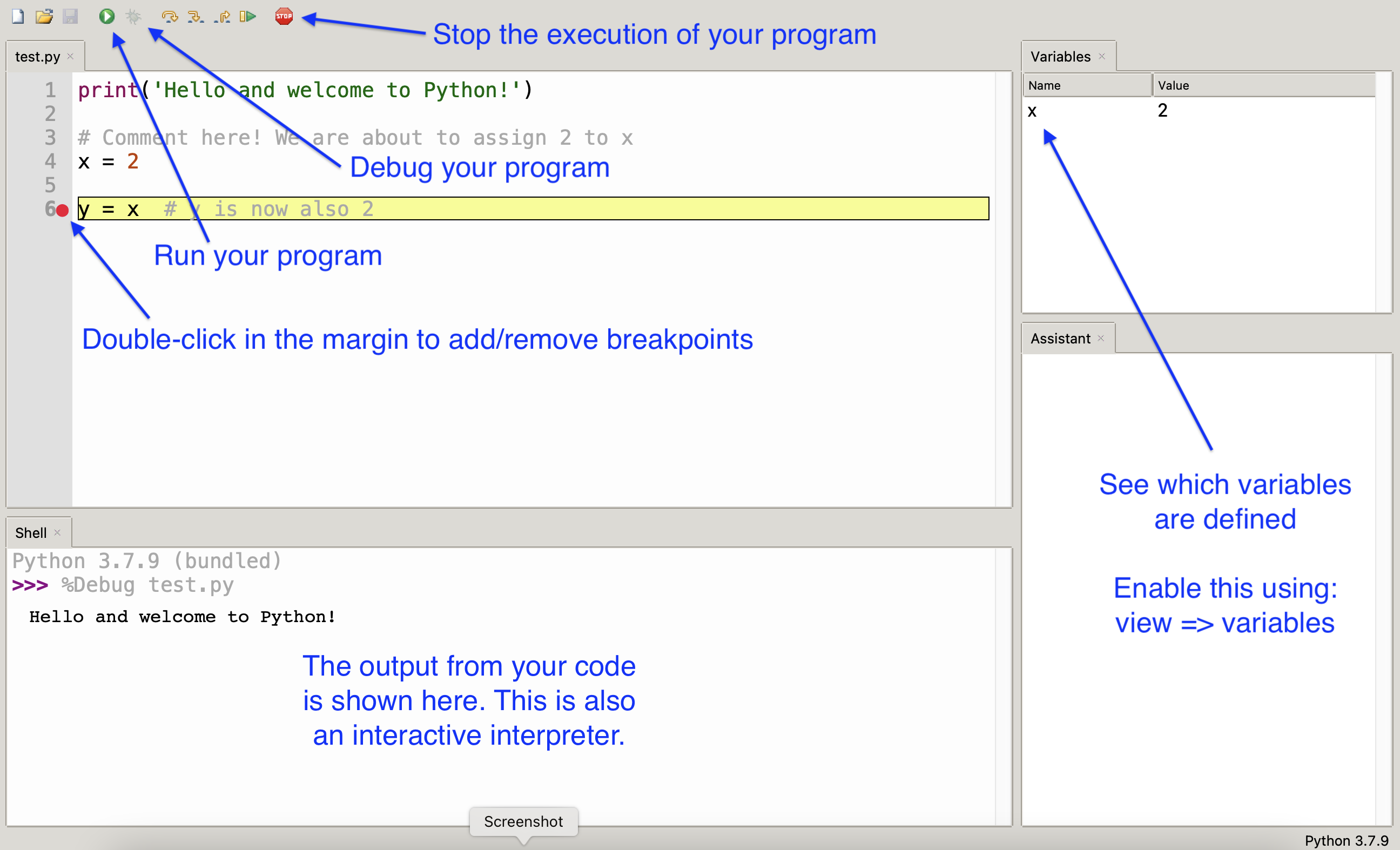
In these notes, you will see embedded code editors that you can actually edit and run right in the page!
Each page has also a Python interpreter embedded at the bottom of the page (it is called Brython) -
which stands for Browser Python). I encourage you to use this tool while you are going through the
notes so that you can try out code snippets! For example, I might suggest typing a specific command into the
interpreter, such as x = 2 and then print(x). Pressing the Enter key
after every command should print the number 2. Try it now!
We will discuss soon what print() is and does and what the effect of writing
x = 2 is.
6. Debugging code
I've been mentioning debugging a few times so let me explain this. We already said that when your program isn't working the way you want, there is a bug. There are different types of bugs that might be introduced in the code:
- syntax errors: are those you get when you are not following the Python syntax. They are similar to
grammatical errors in natural languages, but the interpreter or compiler are waaaaay less forgiving. These are
usually not had to find and correct (debug) because the interpreter (or compiler) will complain right away and
tell you that you are not following the required syntax. (Try to enter the
12 = xcommand in Brython!) - Runtime errors: are a little nastier. They do not show up right away since nothing is wrong with your
syntax but, as your program is running, it might get into a condition that causes an error. The interpreter
will definitely let you know that an error occurred, what it was, and where in your code it occurred. These
might be difficult to debug because the might not happen all the times and they might depend on other
conditions that are independent from your code (e.g., user's input). This is where a debugger can be very
useful since it will allow you to step through your code, command after command, and show you what is
happening. (Try to enter the command
x = 0and then the commandprint(1 / x)in Brython!) - Semantic errors: these are the worst! They are not captured by the compiler and they do not happen at runtime. So, what are they? They are flow in the logic used to solve the problem. For example, in 1999, the Mars Climate Orbiter ($125-million) crashed because one subsystem was providing readings of acceleration in British units (pound-second) while the propulsion system was expecting values in metric unit (newton-second). No syntax error, no runtime error, just a puff of dust from Mars surface when the probe tried to slow down during landing. These errors are very difficult to catch since you have to observe a behavior that is different from what you thought you had programmed. The best way to identify these error is to use testing. This process consist in writing code to exercise your code and check that the output is what you expect given a certain input. We'll talk more about testing!
There are different ways to go about debugging your programs. Some people swear by using print()
statements like we used above, to see the values of certain variables as the program runs or simply tell you if
you have reached a particular spot in your program (add a print("I'm here!") in your program and it
will display I'm here on the screen if you get to that spot). Other people like to use a debugger,
like the one built into Thonny that, as we mentioned before will allow you to:
- run your code one line at a time
- stop at a specific point in the middle of your program by using a breakpoint (a point where execution takes a break) as a place where your debugger while temporarily stop so you can "look around" and see the state of your code)
However you debug your programs, the aforementioned ideas are based on the same principle: looking at an instantaneous snapshot of the state of your program as it executes (we will see what "state" means). To do this, it helps to think of yourself as the interpreter and read through your code one line at a time. Anytime you go to a new line, you should ask yourself: what do I see around here? What is it going to happen when I execute the next line? Is what is happening in line with the idea/model that I have of what should be happening based on my algorithm? If it is different, why is it? What is causing this difference?
Let's look at a fun example!
Setup: Mike Wazwoski is walking towards a wall, starting at a distance of 10 feet (about 3 meters), and walking in increments of 3 feet.
Problem definition: Mike should turn before crashing into the wall (not too different from NASA's problem)!
You had an idea about how to make sure this does not happen and you came up with an algorithm, to decide when to turn, that can be described by the following psudocode:1 if distance to wall equals zero
2 turn left or right
3 otherwise
4 go straight by 3 feetI would like you to stop for a second and ask yourself: is this algorithm going to work? Will it prevent Mike from crashing into the wall?
This is an example of a semantic error. The idea that Mike should probably turn if his distance to the wall is zero sounds good, but this algorithm doesn't work because the distance will never be exactly zero! Check the demo below to investigate this. Anytime you click the "step" button, you are taking a step in the computer program (it is equivalent to what a debugging session would look like) and you can investigate the current value of Mike's distance from the wall...

If this is not working, how would you change the logic so that Mike does not crash into the wall? Where do you think the problem is?
Since Mike is stepping forward by 3 feet each time, anytime the distance is less than 3 feet, the next step will cause Mike to collide with the wall. Therefore, we should turn anytime the distance is less than 3 feet.
Exercises
Can you identify the type of error for each of the following and how you going to catch it?
- Forgetting a parenthesis when is needed in a
printstatement - You code calculates
y = distance / timeand the value fortimehappens to be zero - You wrote a program to simulate throwing a 20-sided dice but you get only values up to 19
- This is a syntax error and the interpreter (or compiler) is going to let you know. Sometimes also the IDEs can highlight syntax errors!
- This is a runtime error. There is nothing really wrong with the syntax of the code, or the
logic. The interpreter will let you know when this error occurs. If you are running a compiled program,
then the OS (our gatekeeper) will let you know about the error. Sometimes using a debugger and following
the flow of the code might also help you get hints about why
timeis zero. - This is a semantic error. Nothing wrong with the syntax, nothing that upset the computer during runtime. You probably have to go back and check your simulator and find out why it is generating numbers only up to 19. This calls for testing early and testing often! If you are just looking at the output of your dice generator, it is going to be easier to see that there is a problem but if, for example, you are running your simulator 20 times and adding all the results together and then check if something is wrong with that sum, it is going to be pretty much impossible to find out that something is wrong!